
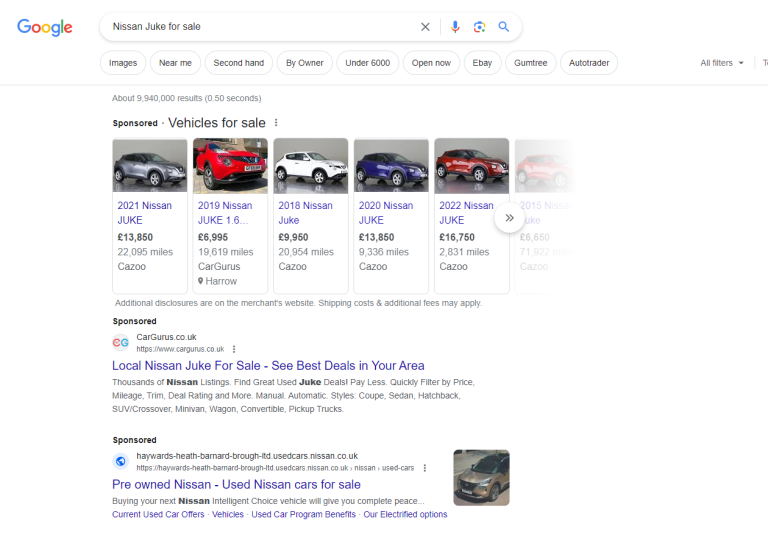
Google Vehicle Ads uses the expansive reach of Google to showcase vehicles directly in Google search results when someone searches for a vehicle using the Google search bar. So, for example, if someone were to key “Nissan Juke for sale” in their search bar, and you had previously set up a Google Vehicle Ads campaign, they would see images of the Nissan Jukes from your dealership, in addition to the prices and other key details.
If you are keen to increase sales via Google’s innovative approach to vehicle advertising, by reading this article, you will learn all of the best tips and tricks to enable you to create eye-catching and attention-piquing adverts.
Table of Contents
ToggleAn Introduction to Google Vehicle Ads
Google announced its new ad format, Google Vehicle Ads (VLAs) in March 2022, in partnership with the National Automobile Dealers Association (NADA). The new ad format was introduced to make it easier for those in the market for a new vehicle to find suitable vehicles nearby through a simple Google search.
Vehicle Listing Ads have become somewhat of a game-changer for online dealerships. Gone are the days of people trawling used car forecourts. A recent survey indicated that 79% of people in the market for a new motor used a search engine. The findings from the survey underscore just how critical it is for automotive brands and dealers to establish a strong digital presence.
Google VAs cut out the confusion and stress of exploring countless car deals by simplifying the process and only showing relevant vehicles at the very top of Google Search Engine Result Pages (SERPs). The images appear with the price, model, and other handy information, such as mileage. After this radical new move in vehicle advertising, car companies can now advertise their entire vehicle inventory in search results.
Furthermore, Google has made it easy for car dealerships to display multiple ads on the same SERP. Car dealers can now display the vehicles for sale and traditional paid-for ads on the same SERP; this gives sellers more flexibility and maximum online exposure.
How Google Vehicle Ads Work
To place a Google Vehicle Ad as an auto advertiser, you will need to provide all your vehicle listings and data attributes to Google Merchant Center (GMC). You must input images, along with the price, make, model, and mileage, along with your advertiser’s name, and a description of the vehicle’s appearance and features.
Once the data has been provided, Google then uses the data to match auto-search enquiries and present them with the most relevant models. For example, if someone is on the hunt for a 2019 SUV, and types “2019 SUV” into their Google search bar, the first thing they will see is a list of several nearby options which match their enquiry along with a snapshot of the most useful information. GMC also enables online car dealerships to monitor their inventories and gain insights into the performance of their ads.
After heading over to the Vehicle Detail Page (VDP), users can either contact the car dealer directly or fill out a contact form to request additional information. Or, if the vehicle which initially caught the user’s eye wasn’t suitable, via the VDP, it is effortless to explore the rest of the dealer’s inventory.
This nifty feat of Google AI-powered vehicle advertising innovation is proven to boost sales online and offline via an increase in dealership visits. The cutting-edge approach to vehicle advertisement propels cross-channel performance via Google Search, Gmail, Discover, Display, and YouTube to expand the reach of online car dealers and maximise advertising impact. Following a beta study, Google announced that dealers experienced a 25% increase in conversions and a 15% ROI after utilising Google’s VLAs.
Note: before creating a vehicle ad, you will first need to create a Google Performance Max Campaign and link your Google Ads account to your Merchant Center Account and Google Business Profile. If you do not manage the profiles for your dealer locations, it is possible to use the store feed option instead.
Pros and Cons of Google Vehicle Ads
As we have already iterated, Google VLAs are highly efficacious in piquing the attention of auto customers; however, there is a myriad of other benefits, along with some potential limitations, which you may want to bear in mind before getting started. Here is a comprehensive overview of the pros and cons so you will know exactly what you are up against when you start a Google VLA campaign.
Google Vehicle Ads Pros: 5 Main Benefits
Targeted Ads for Increased Audience Engagement
Unlike traditional keyword-based marketing, Google Vehicle Ads targets consumers actively looking for a new vehicle (instead of casual browsers) by aligning Google search results with the data/inventory you input. There is a variety of automated targeting options, such as in-market audiences, Google Analytics-curated audience lists and remarketing lists. By using the most suitable targeting options, you can connect with prospective customers based on their location and interests.
Enhanced Exposure and Efficiency
For consumers, searching for a new car using Google VLAs is effortless, as they see exactly what they are searching for and can jump straight to the full ad in just one click – increasing the efficiency of their search. For online car dealerships, VLAs are a convenient way to advertise entire inventories and maximise exposure. Furthermore, it is easy to set up lead form submissions and advertise dealer contact info, which can bring potential buyers one step closer to a sales conversion.
Build Quality Leads with Pre-Click Information
Every click can count with Google Vehicle Ads, as potential customers can view all key information and images before visiting your online dealership page. Whether you are advertising SUVs, vans, trucks, or sedans, you can ensure all website visits and enquiry phone calls are from interested customers.
Omni-Channel Optimisation
Google Vehicle Listing Ads can help you reach your omnichannel sales goals effortlessly by boosting online and offline conversions as your entire inventory will be presented to customers who are exploring local dealerships online and browsing at physical locations.
Measure Your Results with Performance Max
The reporting tools available through Performance Max allow auto advertisers to track several key metrics, including cost-per-acquisition, conversions, clicks, and impressions. These data insights allow advertisers to optimise and hone ad campaigns, and, in turn, boost ROI.
Vehicle Listing Advert Cons
Even though Google Vehicle Ads are a great way to push your business forward, there are a few limitations that need to be considered.
Ad Restrictions
Currently, private sellers and auto brokers are unable to place a Google Vehicle Listing Ad, as the service is exclusively for established businesses and dealerships selling non-commercial passenger vehicles. Furthermore, the ads cannot be used to advertise parts, services, accessories, or tyres.
Prohibited Vehicle Types
Other types of vehicles which cannot be advertised by Google VLAs include:
- Commercial vehicles
- Recreational vehicles
- Buses
- Farm Vehicles
- Trains
- 2-wheelers
- Boats
- Outdoor utility vehicles
- Airplanes
If you are looking to advertise any of the prohibited vehicles or you are operating as a private seller, explore other advertising options via Google here.
How to Set Up a Google Vehicle Ads Campaign
- Create Essential Accounts
- To get started, create a Google Merchant Centre and Google Ads account before creating a Google Business Profile for your dealership – if you manage multiple physical locations, create distinct accounts for each of them.Note: if you already have an existing Google Business Profile or Google Ads account, these can be used for new VLAs.
- Activate Vehicle Listing Ads Program
- After creating a Google Merchant Center Account, register your interest in creating vehicle ads by filling out the relevant form.
- Once the form has been filled out, Google will review your eligibility, and your eligibility will be confirmed within a few days.
- Once you have received confirmation, log into your Google Merchant Centre Account, navigate your way to ‘Growth’, then hit ‘Manage Programs’ to find the ‘Vehicle Ads’ option, then, click ‘Get Started’.
- Input Business Details and Submit Inventory Feed
- Input your business information, including business name, address and phone number, in your Merchant Centre Account
- Verify your business phone number.
- Submit your vehicle inventory feed to Google Merchant Centre to ensure your inventory is accurate and up to date.
- Once your inventory feed and business information has been submitted, Google will review your feed and website within a week.
- Link Your Google Business Profile & Location Selection
- While you are waiting for Google to approve your inventory feed, you can link your Google Business Profile and Google Ads account to Google Merchant Centre. Once linked, Google can tailor listings to local vehicle consumers’ search queries and advertise your location in your VLAs.
- Click here for advice on how to link your Google Ads account with your Google Business Profile.
- Finalise Your Vehicle Listing Ads
- Once your feeds are approved and your accounts are linked, create your first vehicle ad campaign via Google Ads; it is recommended that you opt for a Performance Max Campaign.
- Follow the simple ad creation process, and your listing will be live on Google in minutes!
How to Follow the Google Vehicle Ads Critical Rules
- Geographical Limitations – ensure Google VLAs are available in your country – certain exclusions apply.
- Follow the Image Guidelines – for a successful ad campaign, ensure you follow the image guidelines for all of your inventory. The guidelines prohibit overlaid watermarks, superimposed logos, and placeholder images depicting vehicles which are “coming soon”. Furthermore, the entire vehicle must be showcased in a maximum of ten high-resolution images with minimal backgrounds, without logos or branding. The main image must be a 45-degree front-to-side angle of the vehicle.
- Include All Essential Information – For each vehicle, you will need to populate the inventory with detailed information, such as the make, model, year, VIN, and mileage. As some consumers are highly discerning, the more comprehensive the inventory information, the better.
Google Vehicle Ads Pricing Models
It is easy to work the cost of Google Vehicle Ads around your budget as you can set your advertising budget to suit your finances. Google advises to set aside a daily budget of £100 for a vehicle ad campaign, which equates to a monthly cost of £3,000, however at Vehicle Ads we believe this to be excessive for the UK and would recommend setting a budget aside of between £35.00-£50.00 per day depending on stock volumes, stock type and location.
Tips for Successful VLAs
To optimise engagement and ensure your VLAs stand out from the rest, here are a few tips on how to catch the eyes of potential customers:
- Use Multimedia in Your Ads
Adding videos to your adverts can increase conversions and time spent exploring your online dealership by up to 88%. For the best results, add a soundtrack to your vehicle walkaround to make your videos as engaging as possible. You may want to consider using YouTube Embeds after uploading your MOV, MP4 or MPEG4 files.
- Provide Regular Inventory Feed Updates
Update your inventory feed regularly to showcase new additions and changes to maintain accuracy and demonstrate how relevant and current your listings are to Google – this will boost your visibility in relevant search results.
- Create Engaging Ad Copy
Never settle for the basics – create ad copy that sets you and your vehicles apart from the rest; this could include highlighting special offers, exclusive features, or unique selling points.
- Monitor Your Performance Metrics
Don’t create your ads and forget about them – monitor the performance of your campaigns by tracking impressions, conversions, clicks, and cost-per-acquisition to see what resonates with your target audience. Once you have collated the information, use it to refine your ad strategy and maximise your ROI.
- Pay Attention to Structural Precision
To take your Google Vehicle Adverts to the next level, tailor campaigns to match your inventory goals; don’t just run one campaign for your entire inventory; this can be achieved by tailoring campaigns around certain makes, models, or vehicles in a similar price range. By using this method, you will have better control over your budget, and you will increase the likelihood of profitable conversions.
Conclusion
Through Google Vehicle Ads, all car dealers can conquer the digital landscape and keep up with the fast pace of the automotive marketing world. Hopefully, this guide has given you the complete 101 on automotive advertising in the modern era, and you are now ready to take the leap into effortless and efficacious online advertising.